

Walk into almost any classroom today and you can see how different it is from classrooms long ago. A 14th-century lecture, like the one shown by Laurentius de Voltolina, often looks like this: a teacher speaks from a podium while students sit and listen (some paying attention, some talking, one maybe falling asleep). Many classrooms used to work in a mostly one-way pattern-teacher talks, students receive the message. Communication stayed inside the room and depended on being there in person, along with whatever books were available.
Today, technology is changing how communication works in school. It is not just an extra tool on the side; it shapes how information is shared, how students join in, and how teachers connect with learners. This change is making learning more active, easier to access, and more connected.
This big change has been pushed forward by fast improvements in digital tools, and it sped up even more during recent global events that forced schools to switch teaching styles quickly. From elementary schools to universities, digital tools are now a normal part of school life, creating what many call the “digital classroom.” This is more than trading paper books for screens. It changes how information moves, how students interact with lessons and with each other, and how teachers support learning. Technology now affects daily school routines in many ways, helping schools share updates faster and in more than one format. Many schools also use tools like education digital signage to share messages, post announcements, and make learning spaces feel more engaging across campus.
How Has Classroom Communication Evolved with New Technology?
Classroom communication has changed in dramatic ways. In the past, learning was often limited to a small group of people. Books were rare, and students often had to travel to certain places to study. Communication stayed local, and teamwork usually meant working only with the people in the same room or building. Now, classroom walls matter much less. With the internet, students can reach huge amounts of information-books, audio, photos, and videos-within seconds. This wider access has helped more people learn and has also created new ways for students to talk, share ideas, and work together.
For example, students in a rural classroom in the U.S. can learn about the Arctic by following scientists in real time. They can read blog posts, look at photos, email questions, and even join live video calls. After that, they can compare notes with students in other states who are following the same trip, and they can work together on shared projects using tools like wikis and Google Docs.
This shift has also changed classroom roles. The older “teacher as the main source of knowledge” style is slowly moving toward a model where the teacher guides learning. Students take more responsibility by finding information, checking sources, and sharing what they learn, while teachers coach, support, and evaluate rather than only deliver lectures.

What Are the Main Forms of Technology Used in Classroom Communication?
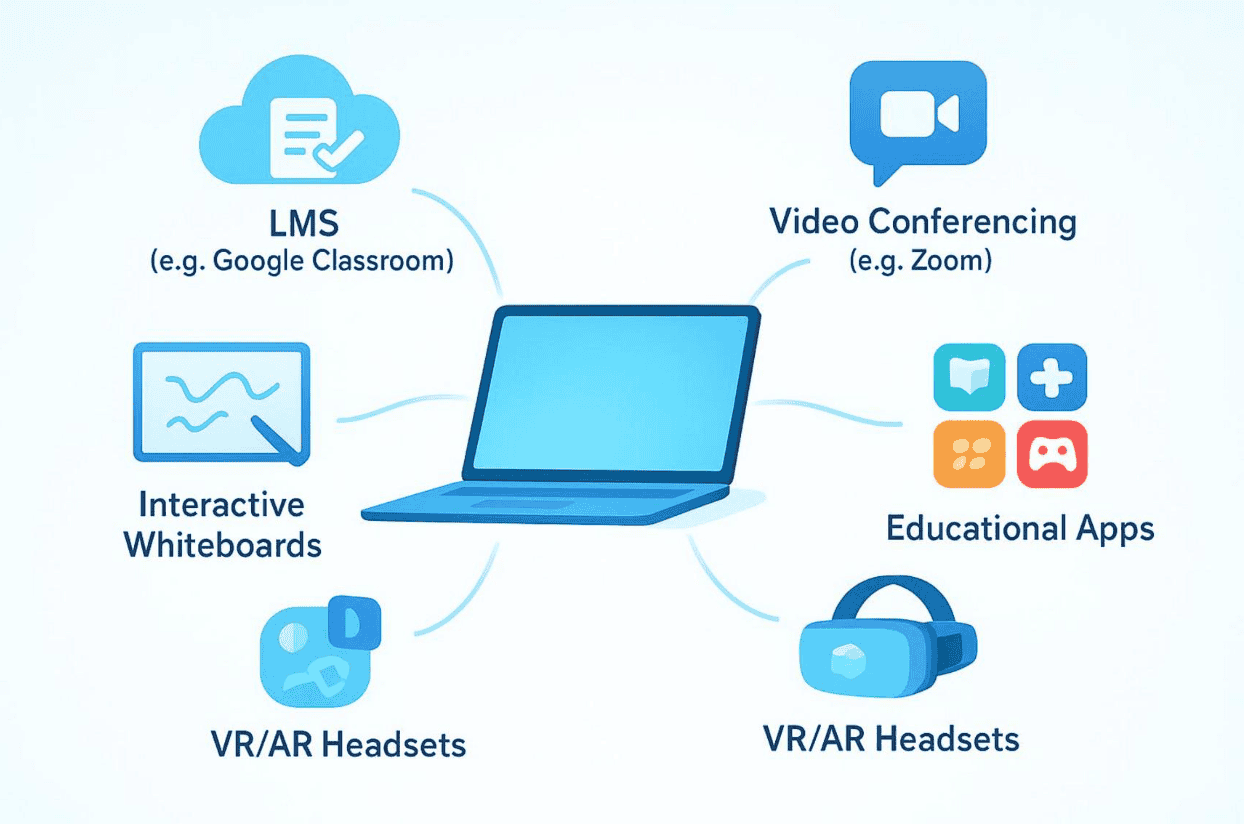
Modern classrooms use many kinds of technology that support communication and learning. Laptops, tablets, and smartphones are common and give students quick access to online materials and class tools. But classroom technology is more than personal devices. Interactive whiteboards and displays managed by Look Digital Signage turn lessons into shared activities, where students can work through problems together and take part in live demonstrations. Virtual reality (VR) and augmented reality (AR) can “bring” students to historical events or help them explore difficult science topics in 3D, which can make hard ideas feel more real. These tools often hold attention better than older methods because they invite students to interact, not just read or listen.
Software also plays a big role. Blended learning—mixing online learning with in-person teaching—is now common, and it can give students more flexibility. Adaptive learning platforms track progress and adjust lessons based on how a student is doing, so students can move at a pace that fits them. Artificial intelligence (AI) is also starting to show up in schools. Some schools test AI helpers that can answer student questions right away. Together, these tools create a classroom where communication happens in many ways and supports different learning styles.
Key Digital Tools and Platforms Powering Modern Classroom Interaction
Digital tools now play a major part in how classrooms work day to day. They do more than help people talk-they also support new teaching methods, help students work more independently, and make lessons more engaging. Teachers can share work quickly, track progress, and even connect students with experts far away.
Learning Management Systems (LMS)
Learning Management Systems (LMS) like Google Classroom, Canvas, and Blackboard act like a central “home base” for many schools. They bring together assignments, submissions, grades, and class materials in one place. For communication, they include tools for announcements, discussion boards, and direct messages between teachers and students. This reduces paperwork and repeated reminders, which gives teachers more time to help students directly. For students, an LMS is a clear place to check what they need to do and what messages they may have missed.
LMS platforms also support teamwork. Students can share files, work together on group tasks, and give peer feedback in an organized space. Teachers can add videos, quizzes, and interactive lessons so students can review materials anytime. Many LMS tools also help keep parents informed, so students, families, and teachers can stay on the same page.
Video Conferencing and Virtual Classrooms
Video tools like Zoom and Microsoft Teams have changed classroom communication, especially by supporting online and hybrid learning. They allow live, face-to-face meetings even when people are in different places. Teachers can run live lessons, lead class discussions, and host virtual office hours. Students can join from home or other locations, which reduces problems caused by distance.
Video conferencing is also useful beyond remote learning. Teachers can bring in guest speakers from other regions or countries, adding real-world viewpoints to class topics. Students can take virtual field trips, talk with students in other countries, and join global group projects. These tools help classes keep a sense of community and keep student-to-student learning going, even when students cannot meet in person as easily.
Educational Apps and Messaging Platforms
Educational apps and messaging tools give teachers and students quick ways to communicate and learn. Some learning apps use game-like features to make hard subjects feel more manageable. Points, badges, and leaderboards can encourage students to participate. Many apps also give instant feedback, so students can see right away what they understand and what they need to fix.
Messaging apps and discussion boards-either inside an LMS or separate-also help students ask questions and get help. For some students, writing a question in a chat feels easier than speaking up in front of the whole class. Many apps also use AI to adjust lessons or act like a tutoring tool, giving support that matches each student’s needs.
Real-Time Polling and Interactive Activities
Real-time polling tools and class activities help teachers keep students involved and quickly check understanding. Platforms like Kahoot! and Mentimeter let teachers ask questions and get instant answers from the whole class. This makes lessons more active and helps quieter students join in without speaking out loud.
Interactive simulations and virtual labs also give students a way to test ideas and see results in a safe digital space. Students can change variables, run experiments, and watch what happens. Because these tools often give immediate results, students get fast feedback and feel progress sooner. Interactive lessons can hold attention better than traditional approaches and often lead to stronger understanding.
Benefits of Technology-Enabled Communication for Students and Teachers
Using technology for classroom communication has brought many benefits for both students and teachers. It can lead to stronger participation, more personalized learning, easier group work, and clearer communication with families. Together, these changes can support a more effective learning environment.
Improved Classroom Engagement and Motivation
One clear benefit is that technology can increase student engagement. Digital lessons are often more interactive and visual than long lectures. Videos, animations, and simulations can make difficult topics easier to grasp, especially for younger students. Instead of only listening, students can explore content and interact with it.
Game-style features like points and badges can also motivate students to participate and practice. Many platforms provide quick feedback, so students can see how they are doing right away. This can help them stay focused and keep going when work gets challenging. As a result, students often feel more in control of their learning and may find school topics more interesting.
Personalized Feedback and Support
Technology helps teachers adjust instruction and give feedback that fits each student. Adaptive learning tools track progress in real time and shift the difficulty or type of practice based on student performance. Students who learn quickly can move ahead, and students who need more time can get extra practice without feeling singled out.
Support can come through AI tutoring tools, custom online assignments, and teacher time saved by automated feedback systems. This can be especially helpful for students with different learning styles or special needs. When students get the right support at the right time, they often build skills faster and feel more confident.
Enhanced Collaboration Among Students
Digital tools have changed how students work together. Cloud-based platforms like Google Docs and Microsoft OneDrive let students create and edit work together in real time. They can share ideas, make edits, and leave comments quickly. This helps students learn from each other and keeps group work moving forward.
Online discussion spaces also support questions and peer help. Explaining an idea to a classmate can strengthen understanding. Technology also makes it possible for students to work with peers in other cities or countries, which brings in new viewpoints and builds teamwork and digital communication skills that matter for future jobs.
Faster and More Transparent Teacher-Parent Communication
Technology has also improved how teachers communicate with parents and caregivers. Many schools use LMS platforms or communication apps that let families see grades, attendance, and updates in real time. This helps parents stay involved, and family involvement is often linked to better student outcomes.
Teachers can also share messages faster. Instead of sending paper notes home, teachers can email or message a whole class at once. Parents can reply through email or school platforms, which can build stronger cooperation between home and school. Quick, open communication can also help address problems earlier.
Challenges and Risks of Technology-Based Communication in Classrooms
Even though technology can improve classroom communication, it also brings challenges. Schools, families, and leaders need to handle these issues carefully so technology supports learning for everyone, instead of creating new problems or making old ones worse.
Digital Divide and Inequality of Access
A major challenge is the digital divide-some students have good devices and reliable internet, while others do not. The pandemic made this very clear, as many students could not fully join remote learning because they lacked equipment or stable connections. This can create unfair gaps where students from lower-income families fall behind because they cannot use the same tools or access the same information.
Schools and leaders need to keep investing in tech access. This can include loaner devices, low-cost internet options, and community locations where students can connect. If schools do not close this gap, technology can increase inequality instead of helping reduce it.
Maintaining Student Privacy and Data Security
As schools use more digital platforms, protecting student data becomes a major concern. Many education tools collect student information, including grades, activity data, and personal details. Keeping this data safe from leaks, misuse, or unauthorized access can be difficult and requires strong security systems and clear policies.
Schools need to check tools carefully, use secure networks, and teach staff and students safe online habits. Problems like cyberbullying, online harassment, or exposure to harmful content also need attention through monitoring and lessons on responsible online behavior. Schools must balance the value of data-based insights with the need to protect student privacy.
Screen Time and Distraction Concerns
Digital devices can support learning, but too much screen time and distractions are real concerns. The same device used for schoolwork can also open social media, games, and other distractions, which can reduce attention during class. As one source jokes, students may be staring at their laptops or phones “instead of books (though probably open to Facebook).”
Heavy dependence on screens can also affect social skills if students replace face-to-face talks with short messages. Reading body language and tone is still an important part of communication, and students may get less practice with it if most interaction is online. Teachers can address this by setting clear rules, teaching self-control with devices, and using technology in ways that support real conversation instead of replacing it.
Ensuring Effective Teacher Training and Adoption
Technology works best in classrooms when teachers know how to use it well. Many teachers want to use digital tools, but they may not have enough training or time to learn them properly. Without strong support, technology can be used only in basic ways, or used incorrectly, which limits its value.
Schools need ongoing training focused on digital skills, teaching methods that work well with technology, and guidance for specific tools. Support can include workshops, online courses, and certifications. Teacher groups that share tips and lesson ideas can also help. Many tech providers offer training resources, but schools still need to give teachers enough time and support to use them in real classrooms.
How Teachers and Schools Can Foster Effective Communication with Technology
Using technology well in classrooms takes planning and clear choices. The goal is not to add technology just because it exists, but to use it in ways that improve communication, support learning, and strengthen relationships across the school community. This includes choosing the right tools, building skills, and involving families.
Strategies for Integrating Communication Tools Effectively
Good technology use does not mean removing traditional teaching. It means mixing methods to create better learning experiences. Teachers should choose tools that match lesson goals. For example, teachers can use short online videos for instruction so students can replay parts they do not understand. This “flipped classroom” style can leave more class time for practice, small-group work, and direct support.
Clear rules for online communication also matter. Students should know expectations for respectful behavior, how quickly they should respond, and which platforms to use for which purpose. Teachers might use an LMS for formal announcements and assignment questions, and messaging tools for quick updates or group project work. Technology should support human connection and clearer communication, not push students into isolated screen time.
Supporting Digital Literacy Among Students and Educators
Digital literacy is now a basic skill, like reading and writing. Students need to learn how to use technology safely and wisely, not just how to click buttons. Skills can include research habits, safe communication, basic coding, data skills, and problem-solving with digital tools. By using technology for projects and teamwork, students build skills they will need in college and in many careers.
Teachers also need ongoing support to build their own digital skills. Regular training helps teachers learn new tools and learn how to use them in ways that support learning and communication. Schools can provide workshops, online courses, and teacher groups where staff share what works. When teachers feel confident with technology, they can teach students how to act responsibly online and how to use digital tools effectively.
Engaging Families through Technological Channels
Technology can make it easier for families to stay connected to school. LMS systems, parent portals, and communication apps can give parents quick access to grades, attendance, deadlines, and school news. When families can see what is going on, they can support students more consistently.
Technology also makes it easier for families and teachers to communicate directly through email or messaging features. Teachers can send updates to a whole class so every family gets the same message. Virtual parent-teacher meetings and online forums can also help parents join in even when schedules or distance make in-person meetings hard. When families stay involved through easy communication channels, students often feel more supported and do better in school.
The Future of Communication in Classrooms: Trends and Opportunities
Looking ahead, technology in education will likely become even more connected and more intelligent. New tools may personalize learning further, reduce time spent on admin tasks, and create immersive learning experiences that go beyond what older classrooms could offer.
Emerging Technologies Impacting Education
Future classrooms may use more new tools that change how students and teachers communicate. Some young students already use voice-based AI tutors and motion-based learning tools, and robotics is starting to appear in some learning activities. AR tools may turn history lessons or hard physics ideas into interactive 3D scenes, so students can explore concepts in a hands-on way using phones or tablets. This can make learning feel more like an experience than a lecture.
Technology may also become more aware of what students need in the moment, offering suggestions, corrections, or even hints about tone during communication. Instead of only sending messages, tools may help students and teachers communicate more clearly and respectfully. Over time, classroom communication may become faster, more available everywhere, and more flexible for different learners.

Potential for Artificial Intelligence in Classroom Communication
AI can change classroom communication in major ways. It can help teachers by handling routine tasks such as basic grading, scheduling, and creating practice quizzes. When teachers spend less time on admin work, they have more time for one-on-one support and building strong relationships with students.
AI tools may also give students custom feedback, writing support, and practice activities that match their needs. Some systems can track engagement and patterns in student work and suggest when extra help is needed. AI may also help schools share updates with students and parents based on real-time data. At the same time, schools will need to train staff to work well with AI tools so that human judgment, critical thinking, and strong people skills stay at the center of education.
Creating Inclusive and Accessible Learning Environments
One of the biggest opportunities is using technology to make learning more inclusive and easier to access. Technology has already expanded access by removing some barriers related to location and income. Online information, along with learning platforms like Khan Academy and MOOCs, gives more people a chance to learn outside traditional classrooms.
In the future, digital tools may better support different learning needs. Adaptive platforms may keep improving so they can adjust lessons based on skill level, speed, and disabilities. Open educational resources (OER) and online libraries may keep growing, giving free learning materials to more students. If schools use these tools with care, they can build learning experiences that work for more students, no matter their background or location. The long-term goal is for technology to support fair access to quality education, matching the United Nations goal of inclusive and equitable education for all by 2030 and beyond.